

Description
Debug A/B Tests in Real Time with AB Tasty
Overview
The AB Tasty Browser Extension is a specialized tool designed to assist web developers and digital marketers in debugging A/B tests directly within the browser. Its primary purpose is to provide real-time visibility into active A/B tests on any webpage, enabling users to quickly identify and resolve issues related to test targeting and execution. This extension is particularly useful when a test fails to display as expected, offering immediate insight into why the test might not be serving to the current user.
Targeted at professionals working with AB Tasty, including front-end developers, QA testers, and conversion optimization specialists, the tool streamlines the troubleshooting process. It allows users to verify whether a test is correctly configured, check the status of targeting rules, and validate if the current environment meets the conditions required for test activation. The extension supports multiple operating systems, including Windows, Mac, and Linux, ensuring broad accessibility across development environments.
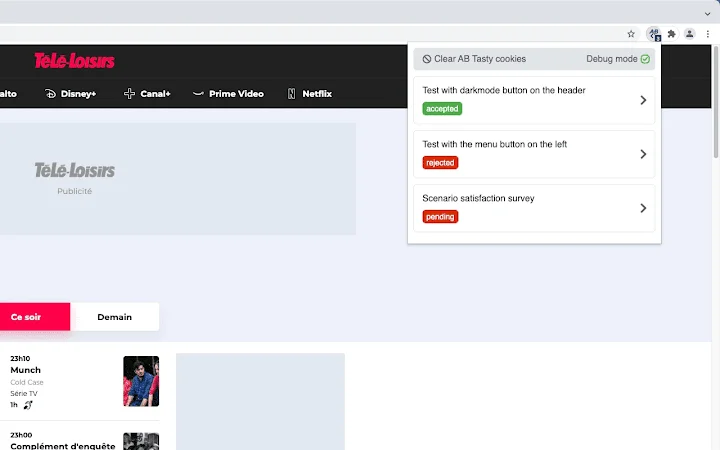
By displaying a badge indicating the number of A/B tests detected on the current page, the tool offers instant feedback. It also presents a categorized list of all tests, prioritizing accepted ones at the top, which enhances workflow efficiency during testing and validation cycles. The developer did not provide additional system requirements beyond the supported platforms.
Key Features & Capabilities
- Real-time A/B Test Detection – Automatically identifies and lists all active A/B tests on the current webpage, providing immediate visibility into test presence.
- Status-Driven Test Sorting – Displays accepted tests at the top of the list, helping users quickly assess which tests are active and properly configured.
- Comprehensive Test Details – Shows essential information such as test ID, name, and AJAX targeting settings, enabling detailed inspection of each test’s configuration.
- Targeting Rule Inspection – Lists all targeting conditions including URL, code, selector, cookie, and IP restrictions, with each rule marked as valid or invalid.
- Invalid Targeting Highlighting – Prioritizes invalid targeting rules at the top of the list, making troubleshooting faster and more intuitive.
- One-Click Edit Link – Provides a direct link to the AB Tasty editor for quick access to modify test settings without leaving the browser.
- Dark Mode Compatibility – Automatically adapts to user’s system theme using the media feature preference, ensuring consistent usability across environments.
- Expandable Targeting Sections – Allows users to collapse or expand individual targeting details for better readability and focused analysis.
These features are especially valuable during QA phases, where developers need to validate that tests are serving correctly across different user segments. The extension’s ability to display invalid targeting rules first helps prioritize debugging efforts. It also supports collaboration between teams by providing a shared, visual reference for test configurations.
User Interface, Workflow & Performance
The user interface of the AB Tasty Browser Extension is minimal and focused, designed to deliver essential information without clutter. A small badge appears in the browser’s toolbar, displaying the number of A/B tests detected on the current page. Clicking the badge opens a panel that presents a clean, organized list of all tests.
Navigating through the interface is straightforward: users can expand individual test entries to view detailed targeting information. The panel uses a clear visual hierarchy, with accepted tests displayed above those with invalid conditions. This layout supports rapid assessment and decision-making during debugging sessions.
The extension integrates seamlessly into the browser workflow, requiring no additional setup or configuration. It operates in the background, scanning the page on load and updating dynamically as content changes. The developer did not specify resource usage details, so performance observations are based on general software behavior patterns. However, given its small size (1.2 MB), it is expected to have minimal impact on system resources.
Compatibility & System Requirements
The AB Tasty Browser Extension is compatible with Windows, Mac, and Linux operating systems. It is designed to work across major desktop browsers, though specific browser versions were not listed. The installation size is 1.2 MB, indicating a lightweight footprint.
Exact system requirements were not listed. The developer did not provide information on minimum CPU, RAM, or disk space needs. Platform compatibility information is limited to the supported operating systems. Users should ensure their browser is up to date to avoid potential issues with extension functionality.
Pros and Cons
Pros
- Real-time detection of A/B tests on any webpage
- Clear visual indication of test status and targeting validity
- Direct link to edit tests in the AB Tasty editor
- Dark mode support for improved visibility in low-light environments
- Compact size (1.2 MB) with minimal system impact
- Intuitive interface with logical test and targeting organization
Cons
- No information on supported browser versions
- Exact performance impact on CPU and memory not specified
- Limited to AB Tasty platform; not compatible with other A/B testing tools
- No offline mode or cached data available for review
FAQ Section
Is the AB Tasty Browser Extension free to use?
Yes, the extension is available at no cost. It is offered as a free tool to support developers and testers working with AB Tasty.
Which browsers does the extension support?
The extension is compatible with Windows, Mac, and Linux systems. Specific browser support details were not provided by the developer.
Can I use this extension offline?
The extension requires an active connection to the AB Tasty platform to retrieve test data. It does not support offline usage or cached test information.
Does the extension affect browser performance?
The developer did not specify resource usage details. However, its small size (1.2 MB) suggests minimal impact on system performance.
How often does the extension update?
Update frequency is not publicly disclosed. Users are advised to check the extension store regularly for new versions.
Final Thoughts
The AB Tasty Browser Extension delivers a focused, high-utility solution for debugging A/B tests in real time. Its ability to instantly reveal test presence, validate targeting rules, and highlight invalid conditions makes it an essential tool for developers and QA teams. The clean interface, dark mode compatibility, and one-click access to the editor enhance usability and efficiency.
While it is limited to the AB Tasty ecosystem and lacks detailed performance metrics, its core functionality is robust and well-executed. For professionals working with AB Tasty, this extension significantly reduces troubleshooting time and improves confidence in test deployments.
Download AB Tasty Browser Extension now
Guides & Tutorials for AB Tasty Debugger Extension for Chrome
How to install AB Tasty Debugger Extension for Chrome
- Click the Preview / Download button above.
- Once redirected, accept the terms and click Install.
- Wait for the AB Tasty Debugger Extension for Chrome download to finish on your device.
How to use AB Tasty Debugger Extension for Chrome
This software is primarily used for its core features described above. Open the app after installation to explore its capabilities.
User Reviews for AB Tasty Debugger Extension for Chrome 0
No reviews found





